
The evolution of enterprise security has been defined by a relentless pursuit of the perimeter. First, we built walls around the data center. Then, cloud adoption blew those walls wide open, forcing us to embrace Secure Access Service Edge (SASE)—a neat architectural convergence of network security controls like Secure Web Gateways (SWG), Cloud Access Security Brokers (CASB), and Zero Trust Network Access (ZTNA).
Early SASE promised a unified way to secure users and data, no matter where they roamed. But as organizations rolled it out, they hit a frustrating wall at the “last mile.” While SASE mastered corporate-owned devices and structured network tunnels, it repeatedly stumbled over the messy reality of modern work: unmanaged endpoints, third-party contractors, and native SaaS interactions.
Enter the secure enterprise browser. Far from being a flashy, short-lived point tool, the enterprise browser is emerging as the critical architectural puzzle piece that makes SASE truly ubiquitous by securing the user interface, and not just compete at the network layer.
SASE’s Early Growing Pains: Where Traditional Architecture Fell Short
To understand why enterprise browsers are exploding in popularity, we have to look at where early iterations of SASE left gaps.
- The Heavy Agent Problem: Forcing a full ZTNA or CASB endpoint client onto a third-party contractor’s personal laptop or a personal device for many is a no-go. It introduces massive deployment friction, privacy pushback, and administrative overhead.
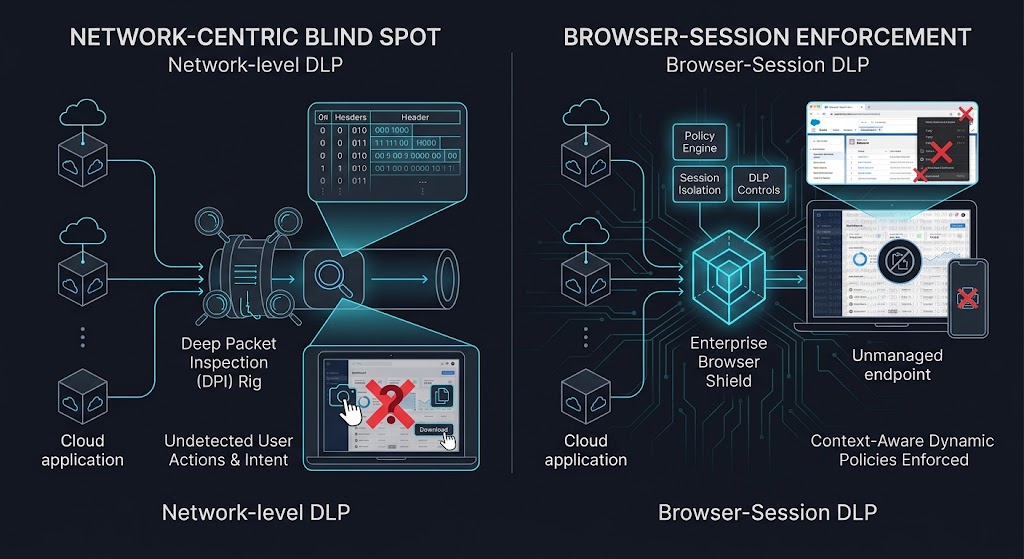
- The “Network-Centric” Blind Spot: Traditional SASE inspects network flows and tunnel transport. But modern work doesn’t happen on the network layer; it happens inside the browser session. Controlling the network pipe doesn’t automatically mean you control what happens inside the application itself.
- The Latency and Routing Trade-off: Backhauling all web traffic through a heavy cloud proxy just to let a vendor check a SaaS dashboard introduces unnecessary latency, performance drag, and bandwidth costs.
The enterprise browser changes the paradigm. Instead of trying to force the device or the network to adapt to the security stack, it embeds security directly into the application’s native delivery mechanism: the web browser.
Gap 1: Frictionless Third-Party & Contractor Access
Every security team knows the dread of onboarding external vendors, agencies, or offshore teams. Historically, you had three bad options:
- Option A: Lower your standards, let unmanaged devices touch sensitive SaaS apps directly, and cross your fingers.
- Option B: Force them down a painful path of MDM (Mobile Device Management) enrollment, heavy VPN agents, and complex compliance checks.
- Option C: Probably the most expensive option of all, pay for a physical device to ship to that third party, a method I’ve seen far too frequently particularly in the public sector
The enterprise browser delivers a third option: instant, lightweight, zero-footprint onboarding.
Because the security posture, session isolation, and access policies are bound to the browser profile rather than the underlying operating system, contractors can securely access corporate apps from virtually any device. They get a seamless user experience, while security teams get strict isolation that prevents corporate data from bleeding onto personal hardware.
Gap 2: True Endpoint Data Loss Prevention (DLP) for SaaS
Traditional network-level DLP is fantastic at seeing where traffic is flowing, but it is largely blind to user intent at the endpoint level. If a contractor opens a sensitive customer record in Salesforce on an unmanaged laptop, stopping them from taking a screenshot, copying text, or downloading a local CSV file is notoriously difficult with network controls alone.
The enterprise browser shifts DLP enforcement directly to the point of rendering. It allows organizations to enforce granular, context-aware policies:
- Dynamic Restrictions: Block copy/paste, printing, and file downloads on unmanaged endpoints while allowing normal workflows on fully managed corporate laptops.
- Visual Deterrence: Apply dynamic, user-identifying watermarks directly across sensitive web pages, discouraging users from snapping photos of their screens with a mobile phone.
Gap 3: Reinventing PAM for Modern Web Applications
Traditional Privileged Access Management (PAM) was built for a different era. Vaulting credentials, managing SSH keys, and routing sessions through heavy jump hosts were designed for legacy infrastructure and administrative command-line access—not for third parties managing cloud consoles, SaaS administration panels, or code repositories.
Enterprise browsers are effectively reinventing PAM for the web layer.
Instead of exposing raw credentials or forcing the use of complex session brokers, a secure enterprise browser can inject credentials invisibly, govern access dynamically, and isolate privileged web sessions entirely. Security teams gain deep, auditable visibility into privileged third-party actions without burdening users with clunky, productivity-killing workflows.
Gap 4: Closing the Loop with Identity Providers (IdP)
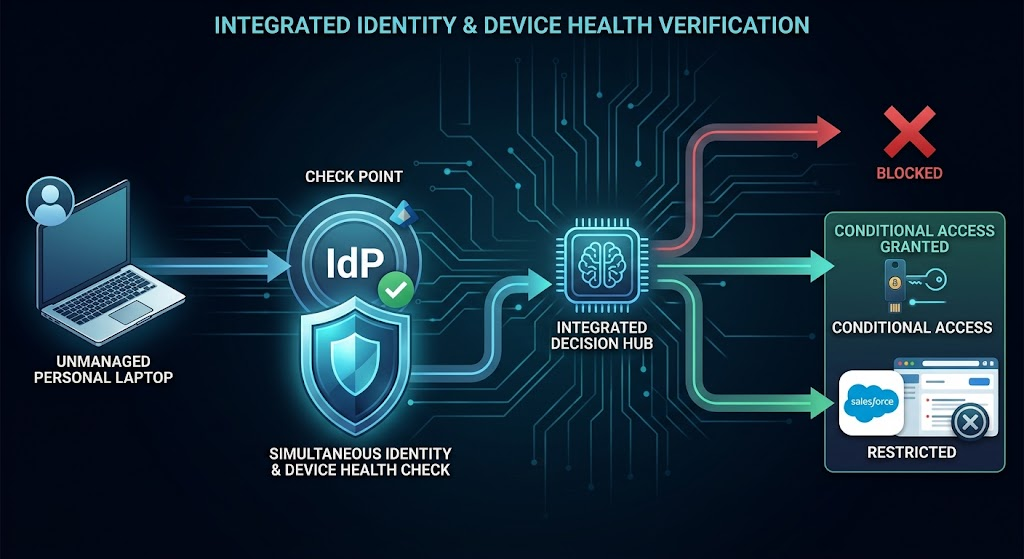
Identity has become the modern perimeter, driven by platforms like Microsoft Entra ID and Okta. However, an IdP login only proves who the user is, not the health or trustworthiness of the device they are holding. A stolen set of credentials entered on an infected personal laptop will easily bypass a standard IdP challenge.
The enterprise browser acts as an intelligent, reactive extension of the IdP. By performing real-time posture checks at the browser level—verifying whether the browser is managed, up-to-date, and compliant—it can dynamically step up authentication or restrict high-risk data access the moment an anomaly is detected.
The Platform Play: Why SASE Giants Are Absorbing the Browser
This architectural gap-filling hasn’t gone unnoticed by the market. Major platform vendors—such as Palo Alto Networks with Prisma Browser (originally Talon), Crowdstrike with Falcon Seraphic Browser amongst others —are aggressively integrating enterprise browser capabilities directly into their unified SASE and SSE frameworks.
For security leaders, this signals a shift away from isolated point solutions. Treating the browser as the lightweight, intelligent edge of a broader SASE fabric gives organisations centralised policy management, unified logging, and consistent enforcement without multiplying the number of agents on a machine.
It isn’t all rainbows and unicorns though…
If you sit on the security team of an organisation whose employees support or build on third-party infrastructure, these browsers present an entirely different operational challenge. By installing a third-party enterprise browser on a corporate asset, you have essentially welcomed a foreign security domain onto your own hardware.
That browser creates a walled garden you cannot see into. Traditional telemetry tools—like local EDR agents, enterprise web proxies, and network DLP—are effectively blinded because the browser tunnels and encrypts its own traffic natively.
Worse yet is the human factor. Once an employee realizes that the restrictions in a third-party browser might be looser (or simply different) than corporate policy, it creates a massive compliance and data-leakage risk. Your corporate device becomes a host for an uncontrolled execution space where company data can mix, exfiltrate, or bypass local telemetry entirely without corporate IT ever knowing.
Conclusion
The enterprise browser isn’t here to replace SASE; it is here to complete it.
By solving the intractable problems of unmanaged device access, granular SaaS DLP, web-based PAM, and identity enforcement, the secure enterprise browser is proving to be one of the most pragmatic, high-ROI security investments of the current cycle.
But as security architects, we have to look at both sides of the coin. When third-party enterprise browsers land on our corporate assets, they introduce new blind spots and foreign security domains that IT must manage. For organizations striving to secure the modern hybrid workforce, the browser is the ultimate missing link—provided you remember that every new perimeter you build inside your endpoint brings its own governance baggage.